A plant watering checklist in one prompt
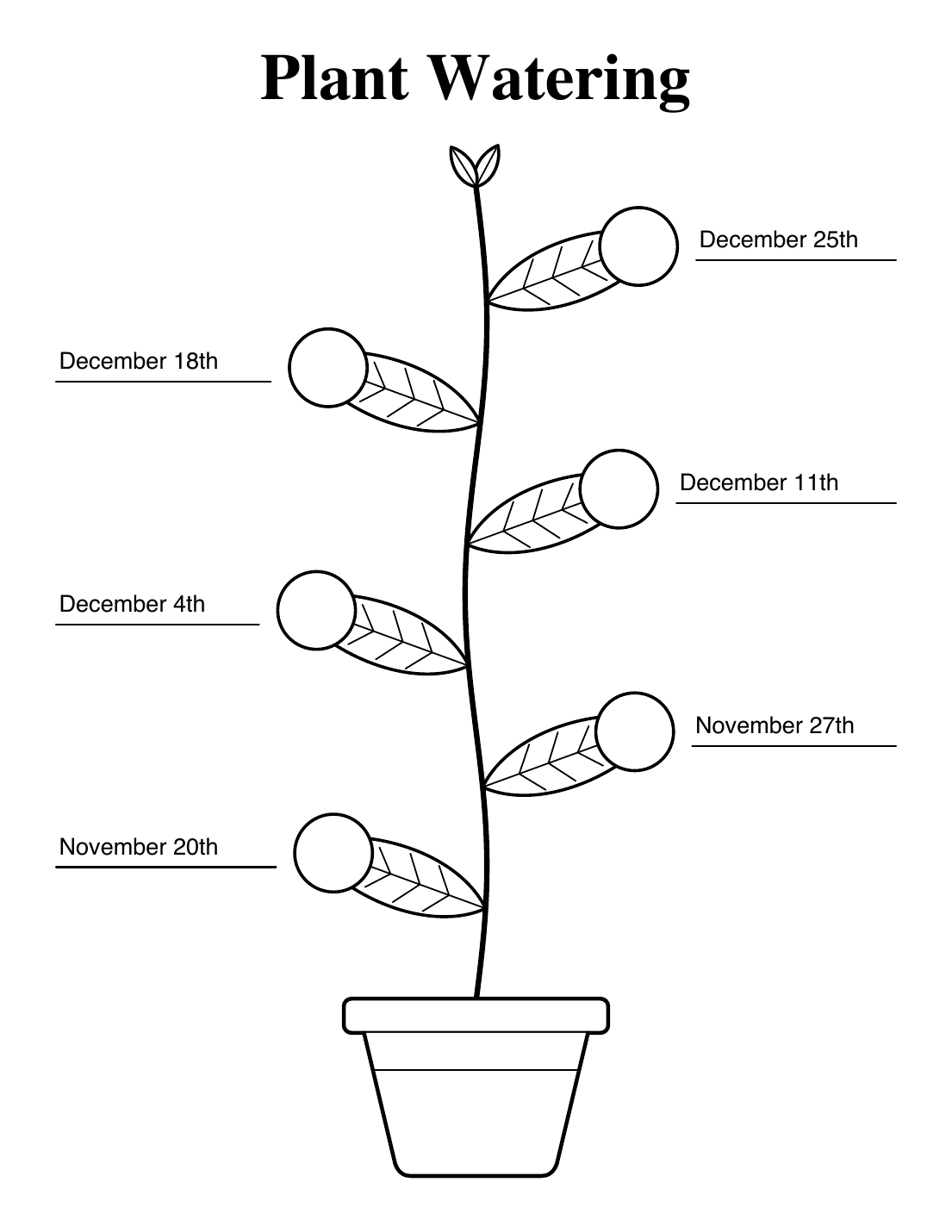
One of the useful things about AI is how quickly it can build something to fulfill a small need. Today we needed a refrigerator checklist to remind us to water the plants. Nothing too fancy. Now we have one.
The checklist is a plant growing out of a pot, with six leaves. Write the date on the line next to a leaf, then put a big checkmark in the circle once the plant has had its drink. The PDF also has fillable date fields, so you can type the dates before you print.
Grab the files if you want to use them:
- plant_watering.pdf is the blank checklist.
- fall_2026_plant_watering.pdf is the filled-in example.
The prompt
This is what I gave Claude, typos and all.
I would like a plant watering checklist with six slots as a single page pdf document. This should be formatting as a picture of a plant growing out of a pot with six leave on alternating sides of the plant was you go up. The height is the whole page in portrait orientation. Each leaf will have an underline to the outside (will fill in dates by hand after printing or, if possible, will add as form data before printing) and a cirle overlapping the leaf where the user will place a big checkmark once the watering is done for that day. This is a line drawing, monochrome, no color. There is a title at the top of the page that reads “Plant Watering”.
The script
Claude wrote and ran this Python script, which uses
ReportLab to draw the plant. Run it with
python plant.py plant_watering.pdf. You can also download
plant.py directly.
import math
import sys
from reportlab.lib.pagesizes import letter
from reportlab.pdfgen import canvas
from reportlab.lib.colors import black, white

out = sys.argv[1]
W, H = letter
CX = W / 2
c = canvas.Canvas(out, pagesize=letter)
c.setTitle("Plant Watering")
c.setStrokeColor(black)
c.setLineCap(1)
c.setLineJoin(1)

# Title
c.setFont("Times-Bold", 42)
c.drawCentredString(CX, 728, "Plant Watering")

STEM_BOT, STEM_TOP = 148, 672


def stem_x(y):
    return CX + 7 * math.sin((y - STEM_BOT) / (STEM_TOP - STEM_BOT) * 3 * math.pi)


# Stem
c.setLineWidth(3.5)
p = c.beginPath()
p.moveTo(stem_x(STEM_BOT), STEM_BOT)
y = STEM_BOT
while y < STEM_TOP:
    y += 2
    p.lineTo(stem_x(y), y)
c.drawPath(p)


def leaf(L, w, veins=True):
    """Leaf in local coords: base at origin, tip at (L, 0)."""
    c.setLineWidth(2)
    p = c.beginPath()
    p.moveTo(0, 0)
    p.curveTo(L * 0.22, w, L * 0.7, w * 0.95, L, 0)
    p.curveTo(L * 0.7, -w * 0.95, L * 0.22, -w, 0, 0)
    c.drawPath(p, stroke=1, fill=1)
    c.setLineWidth(1)
    c.line(0, 0, L * 0.92, 0)
    if veins:
        for t in (0.2, 0.36, 0.52, 0.68):
            x = L * t
            d = w * 0.62 * math.sin(math.pi * min(1, t + 0.18))
            c.line(x, 0, x + L * 0.1, d)
            c.line(x, 0, x + L * 0.1, -d)


# Top sprout
c.setFillColor(white)
for ang, sx in ((62, 1), (58, -1)):
    c.saveState()
    c.translate(stem_x(STEM_TOP), STEM_TOP)
    c.scale(sx, 1)
    c.rotate(ang)
    leaf(30, 8, veins=False)
    c.restoreState()

# Six leaves, alternating sides going up
L, LW, ANG, R = 125, 27, 20, 25
MARGIN = 36
for i in range(6):
    y0 = 208 + i * 78
    x0 = stem_x(y0)
    side = -1 if i % 2 == 0 else 1

    c.setFillColor(white)
    c.saveState()
    c.translate(x0, y0)
    c.scale(side, 1)
    c.rotate(ANG)
    leaf(L, LW)
    c.restoreState()

    # Check circle overlapping the outer end of the leaf
    d = 104
    cx = x0 + side * d * math.cos(math.radians(ANG))
    cy = y0 + d * math.sin(math.radians(ANG))
    c.setLineWidth(2)
    c.setFillColor(white)
    c.circle(cx, cy, R, stroke=1, fill=1)

    # Date underline to the outside
    ly = cy - 9
    if side > 0:
        xa, xb = cx + R + 12, W - MARGIN
    else:
        xa, xb = MARGIN, cx - R - 12
    c.setLineWidth(1.2)
    c.line(xa, ly, xb, ly)

    # Optional fillable date field sitting on the line
    c.acroForm.textfield(
        name=f"date{i + 1}", tooltip=f"Date {i + 1}",
        x=xa, y=ly + 2, width=xb - xa, height=24,
        fontName="Helvetica", fontSize=15,
        borderWidth=0, borderColor=None, fillColor=None,
        textColor=black, forceBorder=False,
    )

# Pot
c.setFillColor(white)
c.setLineWidth(2.5)
rim_w, rim_h, rim_y = 170, 22, 128
c.roundRect(CX - rim_w / 2, rim_y, rim_w, rim_h, 5, stroke=1, fill=1)
p = c.beginPath()
p.moveTo(CX - 72, rim_y)
p.lineTo(CX - 52, 44)
p.curveTo(CX - 50, 38, CX - 46, 36, CX - 42, 36)
p.lineTo(CX + 42, 36)
p.curveTo(CX + 46, 36, CX + 50, 38, CX + 52, 44)
p.lineTo(CX + 72, rim_y)
c.drawPath(p, stroke=1, fill=1)
c.setLineWidth(1)
c.line(CX - 66, 104, CX + 66, 104)

c.showPage()
c.save()
Why bother?
A checklist like this used to mean hunting for clip art or fiddling with a drawing program. Here it took one paragraph of description and just a minute to review and print. Small, throwaway tools are one place AI works nicely since the cost of being wrong is just a few minutes and a few tokens.