Building Jojo: turning job applications into marketing campaigns
Building Jojo: turning job applications into marketing campaigns
When you apply for a job, you’re competing against hundreds of other candidates. Most of them submit a resume and a cover letter. The ambitious ones tailor those documents to the role. And then everyone waits.
No matter how good your resume is, it’s still a PDF in a pile of PDFs. You’re asking a hiring manager to do the work of figuring out why you’re a fit. What if you did that work for them?
That’s the idea behind Jojo, a Ruby CLI I built to transform job applications into personalized marketing campaigns. Instead of sending documents, you send a package: a tailored resume, a cover letter informed by company research, and a dedicated landing page that shows exactly why you’re a match for the role.
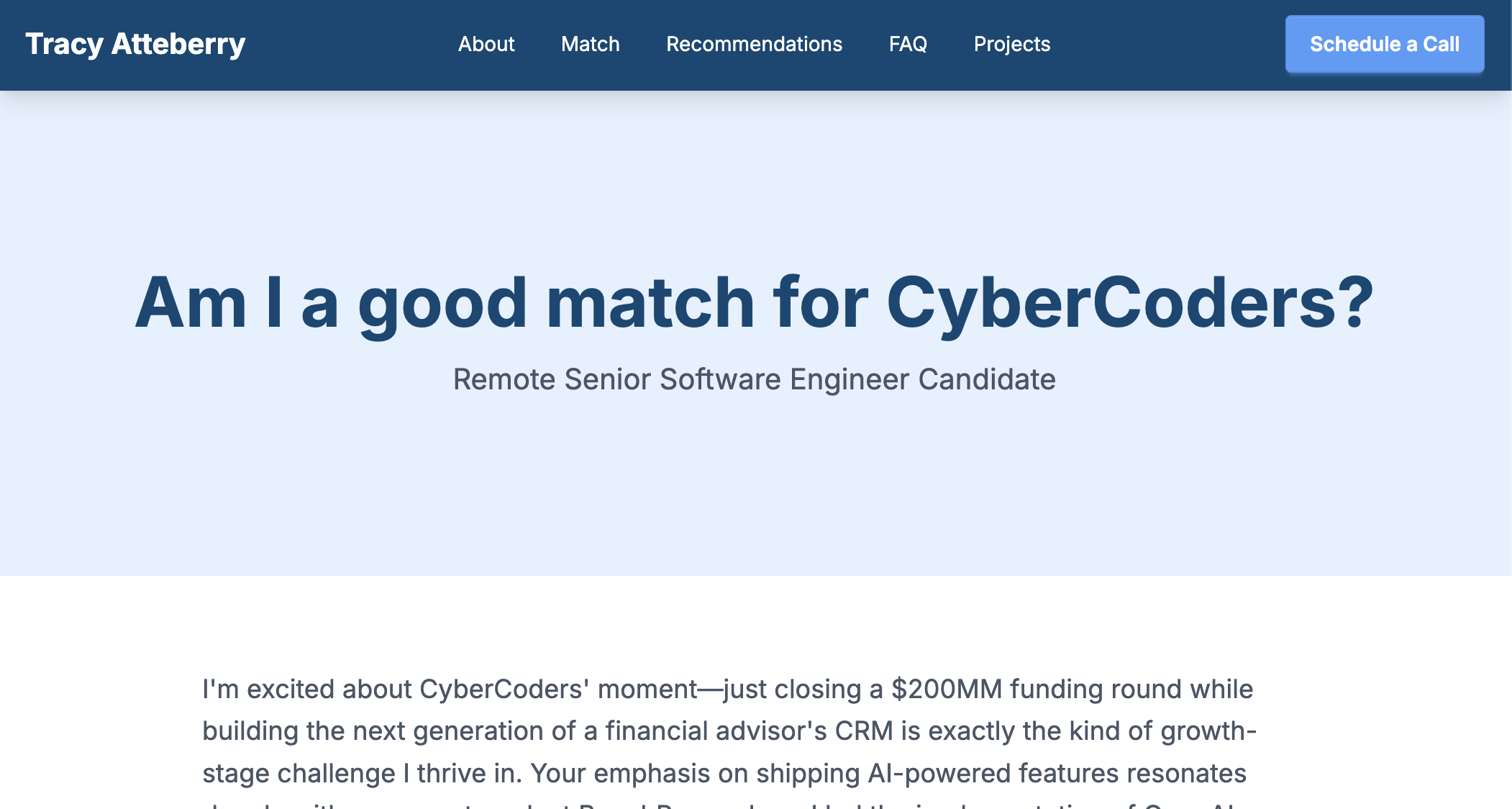
The landing page is the centerpiece. It’s a mini marketing site with an annotated job description that maps your experience to their requirements, portfolio projects selected for relevance to their tech stack, a branding statement written for their company, LinkedIn recommendations, an FAQ section, and a call-to-action to schedule a conversation. It turns a passive application into an active pitch.
Think of it as treating each job application like a product launch. You’re the product. The company you’re applying to is the only customer. Jojo builds the marketing campaign.
How it works
The workflow starts with two inputs: your resume data (a structured YAML file) and a job description (a file or URL). From there, Jojo runs a pipeline of AI-powered generation steps.
# Create a new application workspace
jojo new --slug acme-senior-dev --job posting.txt

# Generate everything
jojo generate --slug acme-senior-dev
The generate command kicks off a sequence:
- Research — AI analyzes the job description and (optionally) searches the web to build a research document about the company, the role, and how to position yourself.
- Resume — Your structured resume data is curated and rendered into a tailored resume, emphasizing the most relevant experience.
- Branding — AI writes a personal branding statement specific to the company and role.
- Cover letter — Generated from the research and tailored resume, so it references specific things about the company rather than generic platitudes.
- Annotations — The job description is analyzed requirement by requirement, with each one mapped to your matching experience.
- FAQ — AI generates role-specific questions and answers based on your background and the job requirements.
- Website — Everything comes together in a self-contained landing page.
- PDF — Resume and cover letter are converted to PDF via Pandoc.
Each step feeds into the next. The research informs the resume tailoring. The resume informs the cover letter. The annotations and FAQ feed into the website. It’s a pipeline, not a collection of independent scripts.
Every application gets its own workspace directory organized by slug:
  applications/acme-senior-dev/
  ├── job_description.md
  ├── job_details.yml
  ├── research.md
  ├── resume.md
  ├── cover_letter.md
  ├── branding.md
  ├── faq.json
  ├── job_description_annotations.json
  ├── status.log
  └── website/
      └── index.html
For daily use, there’s also an interactive TUI mode. Running jojo with
no arguments launches a dashboard that shows all your applications, tracks which
steps are complete, detects when artifacts are stale (because you regenerated a
dependency), and lets you generate or regenerate individual steps with a
keypress. The staleness detection uses file modification times. If you
regenerate your research, the dashboard knows your resume is now stale because
it was built from the old research.
  ┌─ Jojo ────────────────────────────────────────────┐
  │  Active: acme-senior-dev                          │
  │  Company: Acme Corp  •  Role: Senior Developer    │
  ├───────────────────────────────────────────────────┤
  │  Workflow                           Status        │
  │  1. Job Description            $   ✓ Generated    │
  │  2. Research                   $   ✓ Generated    │
  │  3. Resume                     $   * Stale        │
  │  4. Cover Letter               $   ○ Ready        │
  │  ...                                              │
  ├───────────────────────────────────────────────────┤
  │  [1-9] Generate item    [a] All ready    [q] Quit │
  └───────────────────────────────────────────────────┘
The $ indicator shows which steps call paid APIs, so you know if an action
will cost something before you press the key. Steps that just combine existing
artifacts (like website generation) are free.
Architecture: the command pipeline
Jojo is over 5K lines of Ruby source across ~50 source files. Most CLI commands follow the same three-file pattern:
  lib/jojo/commands/{command_name}/
  ├── command.rb    — Orchestration: validates inputs, manages file I/O
  ├── generator.rb  — Content generation: builds context, calls AI
  └── prompt.rb     — AI prompts: system and user prompt templates
So when I need to add a new command, I can create these three files, follow the pattern from the existing commands, and it (hopefully/usually) works. I don’t have to modify a central router or understand the internals of unrelated commands. The pattern helps make the codebase predictable. If you’ve read one command, you understand the shape of all of them. That helps the human and the AI assistant.
This wasn’t the original architecture. The CLI started as a monolith in
cli.rb. Thor command definitions were mixed with validation logic, file
handling, and generation orchestration. It worked fine for the first few
commands, but soon things got messy. Adding a new feature meant navigating a
growing code heap and hoping your changes didn’t break something unrelated.
The refactor extracted each command into its own module with a shared base class that provides common behavior (slug resolution, config loading, AI client setup). The CLI file shrank to a thin router with about 150 lines of small methods that delegate to command classes. Interactive mode, which breifly had a circular dependency calling back into the CLI class (eww) now calls command classes directly through a simple adapter.
Dual AI models
Jojo configures two AI models. There’s a reasoning model for complex tasks and a text generation model for simpler ones.
Company research and resume tailoring need the strongest reasoning capabilities as they’re analyzing job requirements, cross-referencing your experience, and making judgment calls about relevance. But extracting metadata from a job description (company name, location, job title) is easier. Using a powerful model for that is like hiring a senior architect to hang shelves.
The reasoning model handles research, resume curation, and cover letter writing. The text generation model handles job description processing, annotations, FAQ generation, and branding statements. Both models are configurable per provider, so you can use a frontier model for reasoning and a faster model for text generation, or whatever suits your budget and quality needs.
Even with the right model architecture, the AI still has a fundamental trustworthiness problem when it comes to factual content (welcome to AI).
Solving the hallucination problem
This was a technical decision that came from a hard fail.
The original resume generation would take the user’s resume data (stored as structured YAML), combine it with the job description and research, and ask the AI to generate a tailored resume in markdown. The prompt included extensive instructions about not fabricating information. It said things like “only include skills the candidate actually has” and “do not add technologies not present in the source data.”
The AI ignored these instructions way too often. I’d review a generated resume and find “Kubernetes” listed in my skills because the AI noticed I mentioned Docker and helpfully inferred I must know Kubernetes too. Or it would embellish a job description with responsibilities I never had. For a resume, this is not good.
The first instinct was to add more guardrails to the prompt. More emphatic instructions. More examples of what not to do. This helped a little, but it didn’t solve the problem. The AI still had the ability to modify anything, and language-level instructions are suggestions, not constraints.
The insight: different fields have different risk profiles
A professional summary should be rewritten for each role. That’s the whole point, but a list of programming languages must not be modified. The years you worked at a company are facts. Your name is your name.
The problem was that “AI shouldn’t have the same permissions everywhere.” Some fields need smart tailoring. Others need strict preservation. And still others might be removed or reordered. The idea was to define a permission system that specifies what the AI can for different kinds of content.
Permission-based curation
The solution was a permission system embedded directly in the resume data:
name: "Bob Denver"               # default: read-only
email: "bob@example.com"         # default: read-only

summary: |                       # permission: rewrite
  Polyglot developer who enjoys solving problems
  with software...

skills:                          # permission: remove, reorder
  - software engineering
  - full stack development
  - AI assisted development

languages:                       # permission: reorder
  - Ruby
  - Java
  - Python
  - Go

experience:                      # permission: reorder
  - company: "Island Adventures Inc."
    role: "Senior Software Engineer"
    start_date: "2020-07"        # read-only (nested)
    description: |               # permission: rewrite
      Full-stack developer delivering a SaaS platform...
    technologies:                # permission: remove, reorder
      - Ruby on Rails
      - Vue
      - Python
      - Docker
Four permission levels:
- read-only (default) — AI cannot modify, delete, add, or reorder. Contact info, dates, company names.
- remove — AI can exclude irrelevant items but can’t modify the ones it keeps. A database skill list can drop SQLite if the role is all PostgreSQL.
- reorder — AI can prioritize by relevance but can’t remove or modify. Your programming languages list stays complete but puts the most relevant ones first.
- rewrite — AI can generate new content using the original as a factual baseline. Professional summary, job descriptions.
In particular, the AI should never add items that aren’t in the source data. Though there is still a risk of hallucination in rewrite fields, the presence of original content in smaller chunks provides a grounding that makes it less likely.
Two-pass pipeline
The curation happens in two passes:
Pass 1: Filter and reorder. The AI receives the full resume data and the
job description. It returns a filtered, reordered version that respects the
permissions on each field. Skills marked remove, reorder get filtered to ~70%
of the most relevant items and sorted by relevance. Lists marked reorder get
sorted but all items are preserved.
Pass 2: Rewrite fields. The AI receives the filtered data and generates new
content for fields marked rewrite. For example, the professional summary and
experience descriptions. It uses the original content as a factual baseline.
Then an ERB template renders the final markdown. The template handles structure and formatting. The AI never touches the output templating.
What makes this work as an engineering solution is that the Ruby code
enforces the permissions where possible. If the AI returns a reordered list
that’s shorter than the original for a field that only has reorder
permission, the Transformer class raises a PermissionViolation error:
unless can_remove
  if indices.length != original_count
    raise PermissionViolation,
      "LLM removed items from reorder-only field: #{field_path}"
  end
end
The permissions are no longer buried in prompt instructions that the AI might ignore. They’re enforced in code. The AI provides suggestions for how to curate the data, and the Ruby code validates those suggestions against the permission rules before applying them. If the AI tries to exceed its permissions, the operation fails rather than silently producing a resume with fabricated content.
The result is a skills section always contains skills I actually have. My job dates are always accurate. But my professional summary is tailored for each role, emphasizing the experience most relevant to that specific position.
What structured data enables
In order to make the permission system work, we had to switch from an unstructured markdown resume to a structured YAML format. This was a significant architectural change and it required reworking the entire resume generation pipeline. However, it was necessary to address the hallucination problem.
The permission system is the most visible benefit of using structured data, but there are other advantages:
- Narrower AI focus — With structured data, the AI can focus on curating specific fields rather than trying to parse and understand a free-form markdown document. This leads to better quality and more consistent results.
- Better output control — The ERB template handles formatting and structure, so the AI only generates smaller pieces of content. This reduces the chances of formatting errors or hallucinated sections and increases the human control over the final output.
- Easier testing — Structured data is easier to work with in tests. You can create synthetic resume data with specific permissions and verify that the output respects those permissions. With unstructured markdown, it’s harder to assert that the AI didn’t add or modify content it shouldn’t have.
Testing as a development discipline
A permission system that enforces constraints in code is only trustworthy if you actually test the enforcement. Jojo has 530 tests across two tiers, with 84% code coverage. Getting there was an intentional investment.
AI coding assistants are enthusiastic about writing features. They’re less enthusiastic about writing tests. This mirrors human tendencies. Tests aren’t as exciting as shipping the next feature, but with AI-assisted development the gap is amplified.
When the first large refactor was needed I noticed that test coverage was sitting at 31%. The code worked, but I had no safety net for refactoring. The push to 84% was a conscious decision to invest in change enablement.
Three kinds of tests
Jojo has three kinds of tests:
| Kind of test… | It tests… |
|---|---|
| Unit tests | Do small units work? |
| Integration tests | Do small units work together? |
| Linting | Static code analysis |
All tests run on every ./bin/test (or rake test:all) invocation and in CI.
Testing API-dependent code
The trickiest part of testing Jojo is that a lot of interesting work involves AI and Search API calls. You can’t run those in CI without spending money on every test run, but you also want tests that exercise real response parsing.
The solution was the VCR gem. VCR records real HTTP interactions the first time a test runs and saves them as “cassettes.” On subsequent runs, it replays the recorded responses instead of making real API calls. You get fast, deterministic tests that still exercise the full response-parsing pipeline.
Fixture discipline
One rule that has saved me more than once is that tests (and AI) never touch
the inputs/ directory — no matter how much AI would like to. That directory
contains real resume data from the user. Tests use test/fixtures/
exclusively, with synthetic data designed for testability.
This is codified in the project’s AI guidelines, which was previously prone to such mistakes. The instructions are explicit, emphatic, and took a few iterations to be effective. This testing discipline was part of the broader experience of building with AI.
Building with AI
There’s a meta quality to this project: it’s a tool that uses AI to generate content, and it was built with AI assistance. Both Claude and Z helped with development.
AI is pretty good at generating boilerplate, brainstorming design alternatives, and automating the tedious parts of refactoring (like updating 50 files when you rename a class).
But the decisions this post is about — the curation system, the architecture, the decision to refactor and when, the test organization — those were human decisions (as was the choice to use em-dashes just then). AI helped implement them a bit faster, but it didn’t tell me they were needed.
One nice thing about AI-assisted development was the ability to explore approaches quickly. When I was designing the permission system, I could describe different architectures, brainstorm, and get working prototypes, all in fairly short order. That kind of rapid experimentation is really helpful. The design thinking, however, still has to be yours.
One not-so-nice thing was needing to prod the AI to write tests for the features it’s helping to build. Also, let’s be honest, there’s a temptation to let the AI go a little too long before reviewing its output. Left to its own devices, an AI assistant will happily build feature after feature, with no test coverage and growing technical debt. Just like a human developer on a deadline, it needs someone to say “we’re not adding anything else until we address the technical debt, and that includes tests.”
What I learned and what’s next
A few things I’d do differently if I started over:
Start with structured data sooner. The original design used a free-form
markdown resume as input. This was a frightful battle of prompt engineering
from the beginning. The switch to structured YAML data (resume_data.yml) was
the right call, but it required reworking the entire resume generation
pipeline. If I’d started with structured data, the permission system would have
been a natural extension rather than a redesign.
Build the interactive mode earlier. The TUI dashboard made the tool dramatically more usable, but it came in Phase 6 out of 7. Earlier access to the dependency graph and staleness detection would have improved my own workflow during development.
Force TDD from the start, or very near it. I had a test suite from the beginning, of course, but it wasn’t until I hit a major refactor that I made a conscious decision to invest in better test coverage. If I had enforced TDD from the start.
Basically, I would have spent a lot more time up front on planning the architecture and testing strategy, which would have made the development process smoother and more maintainable. AI assistance can be great, but it’s also really good at seducing you into bad habits.
What’s next
A few potential things for the roadmap:
- Interview prep generation — STAR-method examples drawn from your resume data, tailored to the specific role
- More and better theming options — The landing page is Jojo’s UVP, but the current design is pretty basic. More themes and customization options would let users create a landing page that better reflects their personal brand.
- Application tracking — Status tracking across all applications with dates, notes, and follow-up reminders
- Full SaaS product — A Rails app version of Jojo with a user-friendly interface and full job search management features — this would be a much bigger project but could help a wider audience.
Try it out
Jojo is open source and available on GitHub with a documentation site. It’s a Ruby CLI that requires AI and Search provider API keys. Setup takes just a few minutes.
If you’re interested in the code, the architecture, or just want to talk about AI-assisted development, I’d enjoy hearing from you. You can find me on LinkedIn or Mastodon.